AcercaCondicionesPrivacidadContacto
 
Actualizando
Lutron App

Lutron App

Estreno: 2015-01-06
© 2020 Lutron Electronics Co., Inc.
Lutron App - QR Code
Versión 7.3.0
4+
Descárgalo en el App Store
Versión 7.3.0
4+
Descárgalo en el App Store
Estreno: 2015-01-06
© 2020 Lutron Electronics Co., Inc.

Capturas de pantalla del iPhone

Captura de pantalla
Captura de pantalla
Captura de pantalla
Captura de pantalla
Captura de pantalla

Capturas de pantalla del iPad

Captura de pantalla
Captura de pantalla
Captura de pantalla
Captura de pantalla
Captura de pantalla

Descripción

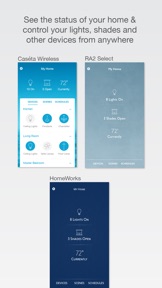
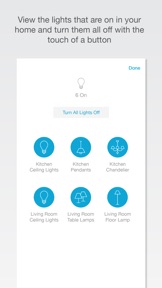
Easily setup and control your home's lights, shades, fans, temperature and Sonos rooms from anywhere with the Lutron app on your iPad, iPhone, iPod touch, and Apple Watch.
The Lutron App requires a Lutron Smart Bridge, Smart Bridge Pro, RA2 Select Main Repeater, or HomeWorks with a QSX Processor and compatible Lutron products:
Smart Bridge:
-Caséta Wireless light dimmers/switches/fan controls and Pico remote controls
-Serena motorized shades
Smart Bridge Pro:
-Caséta Wireless light dimmers/switches/fan controls and Pico remote controls
-Serena, Triathlon and select Sivoia QS Wireless motorized shades
RA2 Select Main Repeater:
-RA2 Maestro light dimmers/switches/fan controls and Pico remote controls
-Triathlon and Sivoia QS Wireless motorized shades
HomeWorks:
-Whole home lighting including Ketra
-seeTouch and Palladiom keypads
-Luxury shading solutions
Also integrates with these other smart home devices:
-Amazon Alexa
-Google Home
-Sonos**
-Honeywell Wi-Fi thermostats including Lyric
-Carrier Côr thermostat
-ecobee3, ecobee4, and Smart Si
-HomeKit thermostats
The Lutron app will walk you through set up with easy step-by-step instructions.
Features:
Control from anywhere
Control lights, shades, fans and temperature in the comfort of your home or from anywhere in the world – the office, the airport, the beach – so lights aren't left on, shades aren't left open, and your HVAC is set back while you're away.
Set the scene
Personalized scenes to control multiple lights and shades together at the touch of a button. Set a "movie" scene that dims the lights and closes the shades, or make a "goodnight" scene that turns off all your lights and closes your shades as you drift off to sleep.
Right on schedule
Schedule scenes to happen automatically at set times of day, or based on sunrise and sunset. Automatically turn on your porch light at dusk, turn it off at dawn, or open your shades in the morning to wake up with the sun.
Geofencing**
Automatically turn lights on when you arrive home and automatically turn lights off when you leave. Receive a notification if you’ve left the lights on after leaving home, then turn them off right from the Notifications screen.
Today Widget Scene Selection**
Turn on your favorite scene from the Today Widget by swiping down from the top of your device's screen. No need to launch the app or even unlock your phone.
Apple Watch App**
Control the lights and shades in your home no matter where you are. Whether you’re on the couch and want to dim the lights for movie night, or on the road and want to make it look like someone’s home, all it takes is a tap. And if the lights are on when you leave the house, you’ll get a notification giving you the option to turn them off. You can even close and open your shades while you are on vacation to give your house a lived in look right from your wrist.
HomeKit Support
Use Siri to control your Lutron lights and shades. If your iPhone is charging on your bedside table, simply say "Hey Siri, turn off my lights." Group your lights together into rooms so you can say things like "Siri, set the Kitchen lights to 50%." App developers can control Lutron dimmers, switches, and window shades.
**Coming soon for HomeWorks.

Novedades de la versión 7.3.0

* Peace of Mind starts at the front door; Caseta and RA2 Select now work with Ring Video Doorbells and Security Cams. Go to Settings, Add Device to get started!
* Caseta and RA2 Select now have Low Battery Alerts in the app. Be alerted if your battery runs low for Picos, Shades, and Occupancy Sensors!
* Various Improvements and Fixes

Vendedor

Nombre

Lutron Electronics Co., Inc.

Información

Categorías

Versión

7.3.0

Tamaño

156.4 MB

Game Center

No

VPP Device Licensing

Puntuación

Clasificación: 4+

Compatibilidad

iOS 11.0 o posterior

Dispositivos

iPhone 5s, iPhone 6, iPhone 6 Plus, iPhone 6s, iPhone 6s Plus, iPhone SE, iPhone 7, iPhone 7 Plus, iPhone 8, iPhone 8 Plus, iPhone X, iPhone XR, iPhone XS, iPhone XS Max, iPhone 11, iPhone 11 Pro, iPhone 11 Pro Max, iPhone SE (segunda generación), iPad (quinta generación) Wi-Fi, iPad (quinta generación) Wi-Fi + Cellular, iPad (sexta generación) Wi-Fi, iPad (sexta generación) Wi-Fi + Cellular, iPad Pro, iPad Pro (Cellular), iPad Pro (9.7 pulgadas), iPad Pro (9.7 pulgadas) (Cellular), iPad Pro (12,9 pulgadas, segunda generación), iPad Pro (12,9 pulgadas, segunda generación) Wi-Fi + Cellular, iPad Pro (10,5 pulgadas), iPad Pro (10,5 pulgadas) Wi-Fi + Cellular, iPad Pro (11 pulgadas), iPad Pro (11 pulgadas) Wi-Fi + Cellular, iPad Pro (12,9 pulgadas, tercera generación), iPad Pro (12,9 pulgadas, tercera generación) Wi-Fi + Cellular, iPad Air, iPad Air (Cellular), iPad Air 2, iPad Air 2 (Cellular), iPad Air (tercera generación), iPad Air (tercera generación) Wi-Fi + Cellular, iPad mini Retina, iPad mini Retina (Cellular), iPad mini 3, iPad mini 3 (Cellular), iPad mini 4, iPad mini 4 (Cellular), iPad mini (quinta generación), iPad mini (quinta generación) Wi-Fi + Cellular, iPad (séptima generación) Wi-Fi, iPad Pro de 11 pulgadas (segunda generación), iPad Pro de 11 pulgadas (segunda generación) (Wi-Fi + Cellular), iPad Pro de 12,9 pulgadas (cuarta generación), iPad Pro de 12,9 pulgadas (cuarta generación) (Wi-Fi + Cellular), iPad Air (4th Generation) (Wi-Fi), iPad Air (4th Generation) (Wi-Fi + Cellular), iPad (octava generación) Wi-Fi, iPad (octava generación) Wi-Fi + Cellular, iPod touch (sexta generación), iPod touch (séptima generación), Apple Watch Series 4

Idiomas

español, chino, francés, inglés, italiano, portugués

App Store: Valoraciones de clientes

Calificaciones y reseñas

4.0 de 5 (7 valoraciones)

App Store: Reseñas de usuarios

2015-12-23

No funciona

Intento abrir la App y se cierra de inmediato. Hago esto varias veces y sucede lo mismo. Apago y prendo el celular para ver si funciona y a veces si puedo usar la App y aveces no quiere abrirla, se vuelve a cerrar... HELP!
Pollynad
Versión 3.1
2015-04-21

Muy buena

Muy buena app y funcional, solo tengo una pregunta, ¿por que al poner un evento programado (que se enciendan las luces a determinada hora) no lo realiza?
Very good app and functional, I have only one question, why that putting a scheduled event (which lights turn on at a certain time) do not realize it?
Isaam 5
Versión 2.0