Actualizando


Capturas de pantalla del iPhone



Capturas de pantalla del iPad




Descripción
Tune the projector before your presentation in a few easy steps, or compare 3D quality on your next home theater system. Just connect to an HDMI, AirPlay, VGA or other video output and this app will display test patterns and play audio test tones with simple instructions for tuning your system. And there's more...
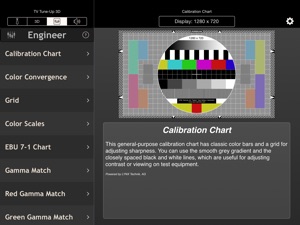
Run TV TuneUp 3D in Executive mode, and take a series of simple steps with clear instructions to perfect the picture on your projector or display. In 3D mode, the app provides advanced tools for measuring the ghosting or crosstalk for different combinations of displays and 3D glasses, for example. Use engineer mode to view a selection of standard test images matched to the resolution of your display. From NTSC from your iPhone's Analog Video Adapter, to full HD 1080p on your iPad's HDMI connector, TVTuneUp3D delivers pixel-perfect synthesized test patterns and industry-standard charts provided by top test-equipment manufacturer LYNX Technik AG.
Get the most from 3D TV
Your iPad or iPhone can send a 3D picture to your 3D TV, and TV TuneUp 3D gives you the tools to find the best system, and get the most from it. First check and tune the stereo alignment, both Top-and-Bottom and Side-by-Side stereo modes are supported. Or use the crosstalk test to measure and minimize ghosting. It will help you find the best glasses or compare the systems in the store before you invest. Ghosting cannot be completely eliminated, but now you can reliably compare different systems, and even tune them to reduce the problem.
Tune up the seats!
Use the parallax samples to try different levels of 3D effect. Make sure the seats are not too close or just verify that the 3D is working, no blu-ray DVD required.
Tune the tunes!
With sample audio tests provided, you can optimize the stereo separation of your audio system, verify the speaker wiring polarity, and check for distortion.
Note, to use AirPlay with any app as a separate display, set AirPlay to Mirroring, and the app can use the display. AppleTV with AirPlay presently support a maximum resolution of 1280x720 when mirroring or working as an external display.
Features:
Tune up your TV with a few simple steps
Great with TV, projector, HDTV, 3D glasses
Supports analog video, VGA, or HDMI adapters, and AirPlay video out
Full access to all video modes for connected devices
High-resolution, professional quality test patterns for standard displays
Stereoscopic 3D test patterns for alignment, crosstalk measurement
3D output in Side-by-Side, Top-and-Bottom, and mono formats
Retina-ready universal app, optimized for iPhone and iPad.
Audio Test Signals
Built-in Help
Novedades de la versión 2.0.0
This app has been updated by Apple to display the Apple Watch app icon.
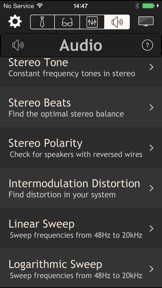
Audio Test Signals - We listened to your requests and added not just a few simple tones but a set of standard audio test signals you can use to test audio equipment for distortion before you buy, or tune your home theater:
Stereo Tones - 8 single-frequency stereo tones including standard A440 and the 'mosquito tone' (17.4kHz)
Stereo Beats - Use ears, physics, and a pair of nearly matched tones to optimize your stereo balance
Stereo Polarity - Check for speakers with reversed wires
Intermodulation Distortion - Test distortion with professional standard test signals from SMPTE, DIN, etc.
Linear and Logarithmic frequency sweeps
White and Pink (1/f) noise
Built-in Help - Gets you connected to your system and tuned up in no time.
Bug Fixes
Visual Improvements
iOS 8 Compatibility
Vendedor
Nombre
Frances Dose
Información
Desarrollador
Categorías
Versión
2.0.0
Tamaño
23.2 MB
Game Center
No
VPP Device Licensing
Sí
Puntuación
Clasificación: 4+
Compatibilidad
iOS 7.1 o posterior
Dispositivos
iPhone 4, iPhone 4S, iPhone 5, iPhone 5c, iPhone 5s, iPhone 6, iPhone 6 Plus, iPhone 6s, iPhone 6s Plus, iPhone SE, iPhone 7, iPhone 7 Plus, iPhone 8, iPhone 8 Plus, iPhone X, iPhone XR, iPhone XS, iPhone XS Max, iPhone 11, iPhone 11 Pro, iPhone 11 Pro Max, iPhone SE (segunda generación), iPhone 12, iPhone 12 Pro, iPhone 12 Pro Max, iPhone 12 mini, iPhone 13, iPhone 13 Pro, iPhone 13 Pro Max, iPhone 13 mini, iPhone SE (tercera generación), iPhone 14, iPhone 14 Plus, iPhone 14 Pro, iPhone 14 Pro Max, iPhone 15, iPhone 15 Plus, iPhone 15 Pro, iPhone 15 Pro Max, iPhone 16, iPhone 16Plus, iPhone 16Pro, iPhone 16ProMax, iPhone 16e, iPad 2 (Wi-Fi), iPad 2 (3G), iPad (tercera generación) (Wi-Fi), iPad (tercera generación) (4G), iPad (4th Generation) (Wi-Fi), iPad (4th Generation) (4G), iPad (quinta generación) Wi-Fi, iPad (quinta generación) Wi-Fi + Cellular, iPad (sexta generación) Wi-Fi, iPad (sexta generación) Wi-Fi + Cellular, iPad Pro, iPad Pro (Cellular), iPad Pro (9.7 pulgadas), iPad Pro (9.7 pulgadas) (Cellular), iPad Pro (12,9 pulgadas, segunda generación), iPad Pro (12,9 pulgadas, segunda generación) Wi-Fi + Cellular, iPad Pro (10,5 pulgadas), iPad Pro (10,5 pulgadas) Wi-Fi + Cellular, iPad Pro (11 pulgadas), iPad Pro (11 pulgadas) Wi-Fi + Cellular, iPad Pro (12,9 pulgadas, tercera generación), iPad Pro (12,9 pulgadas, tercera generación) Wi-Fi + Cellular, iPad Air, iPad Air (Cellular), iPad Air 2, iPad Air 2 (Cellular), iPad Air (tercera generación), iPad Air (tercera generación) Wi-Fi + Cellular, iPad mini (Wi-Fi), iPad mini (4G), iPad mini Retina, iPad mini Retina (Cellular), iPad mini 3, iPad mini 3 (Cellular), iPad mini 4, iPad mini 4 (Cellular), iPad mini (quinta generación), iPad mini (quinta generación) Wi-Fi + Cellular, iPad (séptima generación) Wi-Fi + Cellular, iPad Pro de 11 pulgadas (segunda generación), iPad Pro de 11 pulgadas (segunda generación) (Wi-Fi + Cellular), iPad Pro de 12,9 pulgadas (cuarta generación), iPad Pro de 12,9 pulgadas (cuarta generación) (Wi-Fi + Cellular), iPad Air (4th Generation) (Wi-Fi), iPad Air (4th Generation) (Wi-Fi + Cellular), iPad (octava generación) Wi-Fi, iPad (octava generación) Wi-Fi + Cellular, iPad Pro de 11 pulgadas (tercera generación), iPad Pro de 11 pulgadas (tercera generación) (Wi-Fi + Cellular), iPad Pro de 12,9 pulgadas (quinta generación), iPad Pro de 12,9 pulgadas (quinta generación) (Wi-Fi + Cellular), iPad (novena generación), iPad (novena generación) Wi-Fi + Cellular, iPad mini (sexta generación), iPad mini (sexta generación) Wi-Fi + Cellular, iPad Air (quinta generación), iPad Air (quinta generación) Wi-Fi + Cellular, iPad Pro de 11 pulgadas (cuarta generación), iPad Pro de 11 pulgadas (cuarta generación) (Wi-Fi + Cellular), iPad Pro (12,9 pulgadas, sexta generación), iPad Pro (12,9 pulgadas, sexta generación) (Wi-Fi + Cellular), iPad (décima generación), iPad (décima generación) (Wi-Fi + Cellular), iPad Air de 11 pulgadas (M2) Wi-Fi, iPad Air de 13 pulgadas (M2) Wi-Fi, iPad Air de 13 pulgadas (M2) Wi-Fi + Cellular, iPad Pro de 11 pulgadas (M4) Wi-Fi, iPad Pro de 11 pulgadas (M4) Wi-Fi + Cellular, iPad Pro de 13 pulgadas (M4) Wi-Fi, iPad Pro de 13 pulgadas (M4) Wi-Fi + Cellular, iPad A16, iPad A16Cellular, iPad Air11M3, iPad Air11M3Cellular, iPad Air13M3, iPad Air13M3Cellular, iPad MiniA17Pro, iPad MiniA17ProCellular, iPod touch (5.ª generación), iPod touch (sexta generación), iPod touch (séptima generación)
Idiomas
inglés
App Store: Valoraciones de clientes
Calificaciones y reseñas
0.0 de 5 (Sin valoración)
App Store: Reseñas de usuarios
Ninguna entrada