AcercaCondicionesPrivacidadContacto
 
Actualizando
VizRef Lite

VizRef Lite

Estreno: 2020-03-11
© Studio Pixanoh
VizRef Lite - QR Code
Versión 1.1.7
4+
Descárgalo en el App Store
Versión 1.1.7
4+
Descárgalo en el App Store
Estreno: 2020-03-11
© Studio Pixanoh

Capturas de pantalla del iPhone

Captura de pantalla
Captura de pantalla
Captura de pantalla
Captura de pantalla

Descripción

VizRef Lite® for iPhone enables creatives to finally take their inspiration anywhere on their phones. *You can not use iPad multitasking features with the iPhone version of VizRef. Please Download VIZREF for use on iPad. * It becomes the perfect companion app for Procreate or paired with your favorite drawing/animation application by using your iPhone as a second monitor dedicated to references. Take your reference boards with you while you travel and draw in your sketchbook. Make visual reference boards with any images or gifs from web browsers, cloud storage, photos, screen captures and more. The first mood board creation app made by artists for artists, that brings comprehensive referencing tools to animators and visual artists. We are dedicated to bringing creatives what they need most in being inspired everywhere they go.
HIGHLIGHTS
-VIZREF LITE® version for iPhone has all the same in-app features as VIZREF on iPad ( Vizref Lite if used on IPad does not have multitasking features and is not fullscreen. For iPad please purchase VIZREF®
-Take your visual reference boards with you while you sketch at your favorite locations
-Perfect companion app paired with Procreate® Adobe Fresco ® Clip Studio Paint® Infinite Painter® etc. by utilizing iPhone as a second monitor along with an iPad
-Supports many image types including GIF
-Quickly copy and paste images from web
-Batch Import from Photos app
-Batch Export images from boards to cloud storage using Files app
-Import High-Resolution images with HD toggle
-*Focus on whats importing with Focus mode. ( rotate imageboard )
*Multi-Select and auto pack images for a quicker workflow *
-
-Import from iCloud, Dropbox, Google Drive
-Quick and responsive visual reference board experience
-Easy to use/ minimal UI
-Light mode and Dark mode
-Set thumbnails for reference boards to visually organize your inspiration
ANIMATED GIF SUPPORT
-Reference your favorite animated gifs
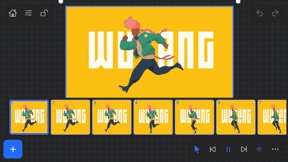
-Pause animation and play frame by frame to better understand referenced animations
-Advanced animation timeline gives you an interactive visual breakdown of all frames
EASY TO USE REFERENCE TOOLS
-Crop images to optimize screen space and view more references
-Greyscale toggle for images for value reference
-Flip horizontally and vertically
-Rotate Images
-Copy-paste images into other apps
Artwork and animation credits
@_Artazi
@_baomii
@_Deadslug_
@amnesiapancake
@barachan
@belgeist
@criisalys
@ergo.josh
@evan_monteiro
@gloomwastaken
@mrbeezul
@onemegawatt
@rocketboiART
@samuelyounart
@cobalt_requin
VizRef was created by Max Gonzalez (@mrbeezul) and RoboWorld Entertainment with supporting development from Valere Labs

Novedades de la versión 1.1.7

NEW FEATURES in 1.1.7
Exporting- Fixed some bugs related to exporting. Some of the UI was unresponsive when hitting export within the app. This was most likely due to some newer IOS versions that were later released. *** Please keep in mind that exporting/ importing directly into other apps such as Dropbox or even using Airdrop and Discord all work completely differently because of how those apps are created. We, unfortunately, can not improve much on batch exporting/ importing into these apps unless those developers improve how their apps deal with multiple images being imported or passing through them. For batch exporting images, I still recommend hooking up Dropbox/ Google Drive to the files app on your iPad and just batch exporting through the files app from Vizref.
Please also keep in mind that batch exporting hundreds of images at once will most likely crash Vizref. This is also out of our control. I recommend batch exporting about 50 images at once for the most stable and consistent experience. Vizref and other apps can't export hundreds of images at once because every app on the iPad is limited to how much Memory it can use during all operations. The app is crashing because of the hard limit set by Apple for each app.
Features
- Revert Button- Revert will undo any cropping or rotating you've done to the image. The main reason for adding the revert button was that some users were finding their images were oddly scaled/ stretched to the wrong ratio. Revert is a backup for returning your image to the correct ratio/ scaling - the revert button is located in the toolbox icon at the bottom right after selecting an image.
- Exporting gif files. Should work now give it a try!
*Bug Fixes*
-Fixed a bug that caused images from your board to not display if your board crashed on exporting. This bug should be completely gone. If it persists after updating your app please contact us at vizrefpro@gmail.com
**If your images have disappeared from your board, please note that those images are still on you iPad and stored locally. You can retrieve them by going to the Files app then searching for your Vizref folder in " On My iPhone " or " On My iPad" file
Open "Private Documents" then you will see each .VRB file. These are your reference boards and store your images locally. You can then retrieve your images here.
Fixed some crash bugs.
Fixed several UI inconsistencies and bugs.

Vendedor

Nombre

Studio Pixanoh Inc

Información

Desarrollador

Categorías

Versión

1.1.7

Tamaño

4.6 MB

Game Center

No

VPP Device Licensing

Puntuación

Clasificación: 4+

Compatibilidad

iOS 13.2 o posterior

Dispositivos

iPhone 5s, iPhone 6, iPhone 6 Plus, iPhone 6s, iPhone 6s Plus, iPhone SE, iPhone 7, iPhone 7 Plus, iPhone 8, iPhone 8 Plus, iPhone X, iPhone XR, iPhone XS, iPhone XS Max, iPhone 11, iPhone 11 Pro, iPhone 11 Pro Max, iPhone SE (segunda generación), iPhone 12, iPhone 12 Pro, iPhone 12 Pro Max, iPhone 12 mini, iPhone 13, iPhone 13 Pro, iPhone 13 Pro Max, iPhone 13 mini, iPhone SE (tercera generación), iPhone 14, iPhone 14 Plus, iPhone 14 Pro, iPhone 14 Pro Max, iPhone 15, iPhone 15 Plus, iPhone 15 Pro, iPhone 15 Pro Max, iPhone 16, iPhone 16 Plus, iPhone 16 Pro, iPhone 16 Pro Max, iPhone 16e, iPhone 17, iPhone 17 Pro, iPhone 17 Pro Max, iPhone Air, iPhone 17e, iPad (quinta generación) Wi-Fi, iPad (quinta generación) Wi-Fi + Cellular, iPad (sexta generación) Wi-Fi, iPad (sexta generación) Wi-Fi + Cellular, iPad Pro, iPad Pro (Cellular), iPad Pro (9.7 pulgadas), iPad Pro (9.7 pulgadas) (Cellular), iPad Pro (12,9 pulgadas, segunda generación), iPad Pro (12,9 pulgadas, segunda generación) Wi-Fi + Cellular, iPad Pro (10,5 pulgadas), iPad Pro (10,5 pulgadas) Wi-Fi + Cellular, iPad Pro (11 pulgadas), iPad Pro (11 pulgadas) Wi-Fi + Cellular, iPad Pro (12,9 pulgadas, tercera generación), iPad Pro (12,9 pulgadas, tercera generación) Wi-Fi + Cellular, iPad Air, iPad Air (Cellular), iPad Air 2, iPad Air 2 (Cellular), iPad Air (tercera generación), iPad Air (tercera generación) Wi-Fi + Cellular, iPad mini Retina, iPad mini Retina (Cellular), iPad mini 3, iPad mini 3 (Cellular), iPad mini 4, iPad mini 4 (Cellular), iPad mini (quinta generación), iPad mini (quinta generación) Wi-Fi + Cellular, iPad (séptima generación) Wi-Fi + Cellular, iPad Pro de 11 pulgadas (segunda generación), iPad Pro de 11 pulgadas (segunda generación) (Wi-Fi + Cellular), iPad Pro de 12,9 pulgadas (cuarta generación), iPad Pro de 12,9 pulgadas (cuarta generación) (Wi-Fi + Cellular), iPad Air (4th Generation) (Wi-Fi), iPad Air (4th Generation) (Wi-Fi + Cellular), iPad (octava generación) Wi-Fi, iPad (octava generación) Wi-Fi + Cellular, iPad Pro de 11 pulgadas (tercera generación), iPad Pro de 11 pulgadas (tercera generación) (Wi-Fi + Cellular), iPad Pro de 12,9 pulgadas (quinta generación), iPad Pro de 12,9 pulgadas (quinta generación) (Wi-Fi + Cellular), iPad (novena generación), iPad (novena generación) Wi-Fi + Cellular, iPad mini (sexta generación), iPad mini (sexta generación) Wi-Fi + Cellular, iPad Air (quinta generación), iPad Air (quinta generación) Wi-Fi + Cellular, iPad Pro de 11 pulgadas (cuarta generación), iPad Pro de 11 pulgadas (cuarta generación) (Wi-Fi + Cellular), iPad Pro (12,9 pulgadas, sexta generación), iPad Pro (12,9 pulgadas, sexta generación) (Wi-Fi + Cellular), iPad (décima generación), iPad (décima generación) (Wi-Fi + Cellular), iPad Air de 11 pulgadas (M2) Wi-Fi, iPad Air de 13 pulgadas (M2) Wi-Fi, iPad Air de 13 pulgadas (M2) Wi-Fi + Cellular, iPad Pro de 11 pulgadas (M4) Wi-Fi, iPad Pro de 11 pulgadas (M4) Wi-Fi + Cellular, iPad Pro de 13 pulgadas (M4) Wi-Fi, iPad Pro de 13 pulgadas (M4) Wi-Fi + Cellular, iPad mini (A17 Pro) Wi-Fi, iPad mini (A17 Pro) Wi-Fi + Cellular, iPad (A16) Wi-Fi, iPad (A16) Wi-Fi + Cellular, iPad Air de 11 pulgadas (M3) Wi-Fi, iPad Air de 11 pulgadas (M3) Wi-Fi + Cellular, iPad Air de 13 pulgadas (M3) Wi-Fi, iPad Air de 13 pulgadas (M3) Wi-Fi + Cellular, iPad Pro de 11 pulgadas (M5) Wi-Fi, iPad Pro de 11 pulgadas (M5) Wi-Fi + Cellular, iPad Pro de 13 pulgadas (M5) Wi-Fi, iPad Pro de 13 pulgadas (M5) Wi-Fi + Cellular, iPad Air11M4, iPad Air11M4Cellular, iPad Air13M4, iPad Air13M4Cellular, iPod touch (sexta generación), iPod touch (séptima generación)

Idiomas

inglés

App Store: Valoraciones de clientes

Calificaciones y reseñas

5.0 de 5 (3 valoraciones)

App Store: Reseñas de usuarios

2024-12-06

Very nice

This a nice alternative for any softwares to keep your references 100% recommend
I have been using for 4 years
hola64753453215
Versión 1.1.7
2021-05-08

Thank you!!!!!!!!

It's a must have for artist/designers, and people that draw traditionally on the run too.
It's easy to understand and has a heavenly price.
Thank you for not being a senseless overpriced subscription service. I will make my children buy this app for generations
Stupid shaked
Versión 1.1.6