AcercaCondicionesPrivacidadContacto
 
Actualizando
Scriptable

Scriptable

Estreno: 2018-09-21
© 2020 Simon B. Støvring
Scriptable - QR Code
Versión 1.6.12
17+
Descárgalo en el App Store
Versión 1.6.12
17+
Descárgalo en el App Store
Estreno: 2018-09-21
© 2020 Simon B. Støvring

Capturas de pantalla del iPhone

Captura de pantalla
Captura de pantalla
Captura de pantalla
Captura de pantalla
Captura de pantalla
Captura de pantalla

Capturas de pantalla del iPad

Captura de pantalla
Captura de pantalla
Captura de pantalla
Captura de pantalla
Captura de pantalla
Captura de pantalla

Descripción

Scriptable is an automation tool that enables you to write scripts that integrates with native features of iOS such as files, calendars, reminders, documents and much more.
An extensive support for widgets enables you to write your own widgets using JavaScript and run the scripts on your Home Screen. Your widgets can show any data and be customised to look just the way you want.
With Siri Shortcuts you can present images, tables and more in Siri as well as making Siri read out loud a text when you run a script from a Siri Shortcut.
There's a growing gallery of scripts to get you started with Scriptable.
Here’s a few examples of scripts you can create:
- Ask Siri whether a web service is down.
- Create a widget that shows data from your weather station.
- Postpone the next event in your calendar half an hour.
- Check what is currently on TV.
- Manage a list of movies you would like to watch.
- Upload files to an image optimizer and store a URL to the optimized image.
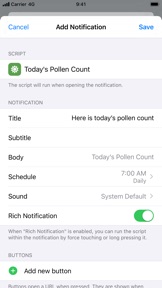
- Receive a notification with the weather report every morning.
- Create todos with prefilled data in your favorite todo app using URL schemes.
Features include:
- Write and run JavaScript.
- Auto complete of variable names, functions, keywords and properties as you type.
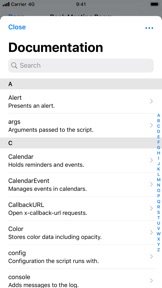
- Access lots of native iOS features from your JavaScript code, including managing files, calendars, reminders, contacts, photos, location, pasteboard, web views and more.
- Create your own widgets. Your scripts run on the Home Screen without needing to open the app.
- Siri Shortcuts enabling you to present images, tables, websites, HTML and more in Siri as well as making Siri read out loud a text.
- Support for input and output parameters in Siri Shortcuts.
- Easily schedule rich notifications to run your scripts periodically.
- Work with files and directories from third party apps using File Bookmarks.
- Synchronise scripts to all of your devices using iCloud Drive.
- Scripts are stored as plain JavaScript files and can be browsed using the Files app.
- Assign one of over 800 glyphs and a color to a script to easily identify it in your directory of scripts.
- Run scripts directly on your Home screen using widgets.
- Run a script by 3D touching the app icon.
- Run a script from a share sheet and process the inputs.
- Schedule notifications and run a script directly from a notification.
- URL schemes enabling you to run scripts from other apps.
- Support for x-callback-url enabling advanced integration with other apps that support x-callback-url.
- Export and share scripts.
- Example scripts helping you get started creating your own scripts.
- Extensive documentation for all the native APIs you can use in your scripts. Available offline in the app and online on docs.scriptable.app.
- View the documentation in a separate window on iPad.
- Support for dark mode.
- Customise the editor to your liking.

Novedades de la versión 1.6.12

This update fixes an issue where scripts would sometimes not run when launched from the Home screen. If you're still seeing issues with this, please remove the script from your Home screen and add it again.

Vendedor

Nombre

Simon Stovring

Información

Desarrollador

Categorías

Versión

1.6.12

Tamaño

20.6 MB

Game Center

No

VPP Device Licensing

Puntuación

Clasificación 17+ por lo siguiente:
Acceso a internet sin restricciones

Compatibilidad

iOS 14.0 o posterior

Dispositivos

iPhone 5s, iPhone 6, iPhone 6 Plus, iPhone 6s, iPhone 6s Plus, iPhone SE, iPhone 7, iPhone 7 Plus, iPhone 8, iPhone 8 Plus, iPhone X, iPhone XR, iPhone XS, iPhone XS Max, iPhone 11, iPhone 11 Pro, iPhone 11 Pro Max, iPhone SE (segunda generación), iPhone 12, iPhone 12 Pro, iPhone 12 Pro Max, iPhone 12 mini, iPhone 13, iPhone 13 Pro, iPhone 13 Pro Max, iPhone 13 mini, iPhone SEThirdGen, iPad (quinta generación) Wi-Fi, iPad (quinta generación) Wi-Fi + Cellular, iPad (sexta generación) Wi-Fi, iPad (sexta generación) Wi-Fi + Cellular, iPad Pro, iPad Pro (Cellular), iPad Pro (9.7 pulgadas), iPad Pro (9.7 pulgadas) (Cellular), iPad Pro (12,9 pulgadas, segunda generación), iPad Pro (12,9 pulgadas, segunda generación) Wi-Fi + Cellular, iPad Pro (10,5 pulgadas), iPad Pro (10,5 pulgadas) Wi-Fi + Cellular, iPad Pro (11 pulgadas), iPad Pro (11 pulgadas) Wi-Fi + Cellular, iPad Pro (12,9 pulgadas, tercera generación), iPad Pro (12,9 pulgadas, tercera generación) Wi-Fi + Cellular, iPad Air, iPad Air (Cellular), iPad Air 2, iPad Air 2 (Cellular), iPad Air (tercera generación), iPad Air (tercera generación) Wi-Fi + Cellular, iPad mini Retina, iPad mini Retina (Cellular), iPad mini 3, iPad mini 3 (Cellular), iPad mini 4, iPad mini 4 (Cellular), iPad mini (quinta generación), iPad mini (quinta generación) Wi-Fi + Cellular, iPad (séptima generación) Wi-Fi + Cellular, iPad Pro de 11 pulgadas (segunda generación), iPad Pro de 11 pulgadas (segunda generación) (Wi-Fi + Cellular), iPad Pro de 12,9 pulgadas (cuarta generación), iPad Pro de 12,9 pulgadas (cuarta generación) (Wi-Fi + Cellular), iPad Air (4th Generation) (Wi-Fi), iPad Air (4th Generation) (Wi-Fi + Cellular), iPad (octava generación) Wi-Fi, iPad (octava generación) Wi-Fi + Cellular, iPad Pro de 11 pulgadas (tercera generación), iPad Pro de 11 pulgadas (tercera generación) (Wi-Fi + Cellular), iPad Pro de 12,9 pulgadas (quinta generación), iPad Pro de 12,9 pulgadas (quinta generación) (Wi-Fi + Cellular), iPad (novena generación), iPad (novena generación) Wi-Fi + Cellular, iPad mini (sexta generación), iPad mini (sexta generación) Wi-Fi + Cellular, iPad AirFifthGen, iPad AirFifthGenCellular, iPod touch (sexta generación), iPod touch (séptima generación)

Idiomas

español, alemán, árabe, bokmal noruego, chino, coreano, danés, finés, hebreo, inglés, italiano, japonés, malayo, neerlandés, portugués, ruso, sueco, tailandés, turco

App Store: Valoraciones de clientes

Calificaciones y reseñas

4.6 de 5 (70 valoraciones)

App Store: Reseñas de usuarios

2022-01-18

😐

DESDE QUE INSTALE ESTA APP MI IPAD SE ESTA TRABANDO 😡😡😡😡😡 1 ESTRELLA
cloudychrxlz
Versión 1.6.12
2020-11-07

YouTube PiP

☝️
Luis_Marti
Versión 1.6.1
2020-04-24

This should be shortcuts power mode

This is what the ios should work and look like if it had a power mode. As a seasoned developer, coding in text is not a problem, but creating very long shortcuts it a no go, mostly due to the constan headache of trying to figure out what is the last element and setting variables. But with this tooI I can do quick scripts that do the work on a simpler and concise way, and sharing is quite easy as well.
IAIOMAN117
Versión 1.4.9
2018-10-03

Almost 5 stars, need a stdout (like c)

Hey it seems great all it can do with just code, i see that using args.any[] can receive as input. But I’m looking for some method or way to send as output a variable. I mean, after finishing the script.
erick.doez
Versión 1.0