AcercaCondicionesPrivacidadContacto
 
Actualizando
DSLR Clapperboard

DSLR Clapperboard

Estreno: 2018-06-15
© 2019 DM
DSLR Clapperboard - QR Code
Versión 5.30
4+
Descárgalo en el App Store
Versión 5.30
4+
Descárgalo en el App Store
Estreno: 2018-06-15
© 2019 DM

Capturas de pantalla del iPhone

Captura de pantalla
Captura de pantalla
Captura de pantalla
Captura de pantalla
Captura de pantalla
Captura de pantalla
Captura de pantalla

Capturas de pantalla del iPad

Captura de pantalla
Captura de pantalla
Captura de pantalla
Captura de pantalla
Captura de pantalla
Captura de pantalla
Captura de pantalla
Captura de pantalla
Captura de pantalla
Captura de pantalla

Descripción

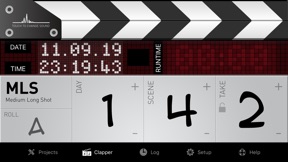
A few taps and you are on-air: select the angle, scene and take of your shot and tap on the clapper. You can edit the items and the descriptions in the setup page of the app to fully customize it.
Features' list:
CLAPPERBOARD
- Full customization of the clapboard: design your own slate with a few touches. (IPad version)
- Project based clapboard: start, stop and recall your work at your needs.
- Switch from timer to timecode (24, 25, 30, 50 and 60 fps).
- Choose among 3 different clap sounds.
- Auto takes advance, to update the take after each shot.
- Stopwatch, to have time under your control.
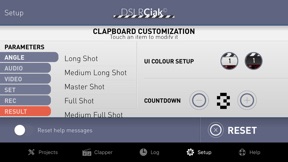
- Full customization, to have a clapperboard exactly the way you like.
- Remarks, allows you to add notes during the shooting.
- Log history, to keep everything under your eyes.
- Summary e-mail report, to send the result of your shooting in your inbox (in-app purchase).
In-App Purchase (for a short period of time at a very competitive price):
PROMPTER (IPad version)
- Unlimited number of scripts.
- Bookmarks, to jump directly to the point.
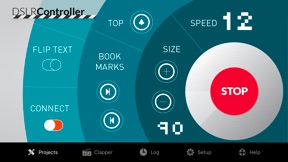
- Remote control, with full preview at your fingertips.
- Easy connection, over bluetooth or wi-fi.
- Speed wheel, for an innovative user interaction.
- Change font size from the remote control.
- Flip text on the fly.
- Drag text on the remote control, the prompter will follow accordingly.
- Auto prompter: set up your speed and then start playing it.
STORYBOARD (IPad version)
- Import any image or picture you have as a frame of your storyboard.
- Give it a number (also 12B-2C#2) and a description.
- You can automatically import you storyboard with the new DSLR Template available for download at your fingertip.
- Synchronize your storyboard with the clapperboard (scene number and final summary email).
---
To ask for new features and to report bugs, please refer to www.dslrciak.it/customercare/.

Novedades de la versión 5.30

- NEW (5.30): Added the prompter controller in the main app for the iPhone. You can now take control over the iPad prompter through your iPhone (same app: buy one get two!).
---
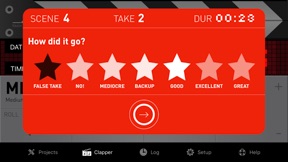
- NEW (5.20): Added a better notes feature during shooting session with 6 default events to choose from
- NEW (5.20): Added a save functionality to the custom layout view to store your own creations and recall them later
- BUGFIX (5.20): fixed a bug that prevented the keyboard from hiding away in the remarks textfield
- BUGFIX (5.20): fixed a localization issue that presented the wrong language in some cases
- BUGFIX (5.20): minor bugfixes

Vendedor

Nombre

Daniele Morelli

Dirección

Información

Desarrollador

Categorías

Versión

5.30

Tamaño

132.1 MB

Game Center

No

VPP Device Licensing

Puntuación

Clasificación: 4+

Compatibilidad

iOS 11.0 o posterior

Dispositivos

iPhone 5s, iPhone 6, iPhone 6 Plus, iPhone 6s, iPhone 6s Plus, iPhone SE, iPhone 7, iPhone 7 Plus, iPhone 8, iPhone 8 Plus, iPhone X, iPhone XR, iPhone XS, iPhone XS Max, iPhone 11, iPhone 11 Pro, iPhone 11 Pro Max, iPhone SE (segunda generación), iPhone 12, iPhone 12 Pro, iPhone 12 Pro Max, iPhone 12 mini, iPad (quinta generación) Wi-Fi, iPad (quinta generación) Wi-Fi + Cellular, iPad (sexta generación) Wi-Fi, iPad (sexta generación) Wi-Fi + Cellular, iPad Pro, iPad Pro (Cellular), iPad Pro (9.7 pulgadas), iPad Pro (9.7 pulgadas) (Cellular), iPad Pro (12,9 pulgadas, segunda generación), iPad Pro (12,9 pulgadas, segunda generación) Wi-Fi + Cellular, iPad Pro (10,5 pulgadas), iPad Pro (10,5 pulgadas) Wi-Fi + Cellular, iPad Pro (11 pulgadas), iPad Pro (11 pulgadas) Wi-Fi + Cellular, iPad Pro (12,9 pulgadas, tercera generación), iPad Pro (12,9 pulgadas, tercera generación) Wi-Fi + Cellular, iPad Air, iPad Air (Cellular), iPad Air 2, iPad Air 2 (Cellular), iPad Air (tercera generación), iPad Air (tercera generación) Wi-Fi + Cellular, iPad mini Retina, iPad mini Retina (Cellular), iPad mini 3, iPad mini 3 (Cellular), iPad mini 4, iPad mini 4 (Cellular), iPad mini (quinta generación), iPad mini (quinta generación) Wi-Fi + Cellular, iPad (séptima generación) Wi-Fi + Cellular, iPad Pro de 11 pulgadas (segunda generación), iPad Pro de 11 pulgadas (segunda generación) (Wi-Fi + Cellular), iPad Pro de 12,9 pulgadas (cuarta generación), iPad Pro de 12,9 pulgadas (cuarta generación) (Wi-Fi + Cellular), iPad Air (4th Generation) (Wi-Fi), iPad Air (4th Generation) (Wi-Fi + Cellular), iPad (octava generación) Wi-Fi, iPad (octava generación) Wi-Fi + Cellular, iPod touch (sexta generación), iPod touch (séptima generación)

Idiomas

inglés, italiano

App Store: Valoraciones de clientes

Calificaciones y reseñas

2.5 de 5 (2 valoraciones)

App Store: Reseñas de usuarios

2018-12-19

Prompter does not work

When you clock the promoter icon the app close, please fix the bug. Is a great app
Al533299
Versión 2.0