Actualizando


Capturas de pantalla del iPhone


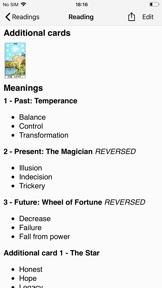

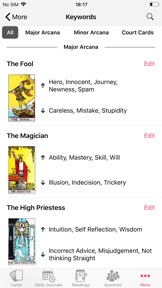


Capturas de pantalla del iPad


Descripción
78 card images with keywords gives you the ability to input your own keywords for reference and study.
Easy to use Tarot tool for seasoned Tarot readers.
Log all the information after Tarot reading with querent, quick and easy to email PDF or HTML of your reading.
Choice of a selection of built in spreads and notes for customer to keep.
You can add your own card sets using the camera or importing saved images of cards.
Create your own spreads and edit the meanings of each card in the spreads.
Search for readings by card name, keywords, questions or your notes for the reading.
Edit keywords for each card, upright and reversed
Daily Journal great for seasoned professional readers or people new to the tarot to create personal daily tarot journal. Choice of one card or 5 card daily reading.
Choice of using reversed cards.
"Learn Keywords" lets you run tests to pick cards given a list of keywords to improve your learning of what cards mean.
On iOS 13.4 devices you can add Shortcuts for Siri - you will need to activate the Shortcuts in the Settings view of the Tarot Journal app and you can then ask Siri (even when app is not open) to:
1. Deal a random Tarot Card - ask "Deal Tarot Card"
2. Find Tarot Cards by keyword or name - ask "Find Tarot Card" then when requested give the card name or keyword
3. Start a new Reading - ask "New Tarot Reading"
You have some control over editing how the Readings appear in PDF/HTML when sharing with your Querent.
Data is shared via iCloud to other iPhones and iPads.
Great way of keeping in touch with clients for return or future readings.
Novedades de la versión 3.16
You can now change the card set in the Cards view tapping on the nav bar title
You can now restore Spreads, Card sets and tests from backups, restoring Querent and Readings will be in a later update.
Bug fixes and other behind the scene improvements
We will continue to improve and fix issues that you may find, please contact us if you have any ideas for improvements or issues using the app.
Vendedor
Nombre
Steve Godfrey
Dirección
Información
Desarrollador
Categorías
Versión
3.16
Tamaño
33.8 MB
Game Center
No
VPP Device Licensing
Sí
Puntuación
Clasificación: 4+
Compatibilidad
iOS 13.0 o posterior
Dispositivos
iPhone 5s, iPhone 6, iPhone 6 Plus, iPhone 6s, iPhone 6s Plus, iPhone SE, iPhone 7, iPhone 7 Plus, iPhone 8, iPhone 8 Plus, iPhone X, iPhone XR, iPhone XS, iPhone XS Max, iPhone 11, iPhone 11 Pro, iPhone 11 Pro Max, iPhone SE (segunda generación), iPhone 12, iPhone 12 Pro, iPhone 12 Pro Max, iPhone 12 mini, iPhone 13, iPhone 13 Pro, iPhone 13 Pro Max, iPhone 13 mini, iPhone SE (tercera generación), iPhone 14, iPhone 14 Plus, iPhone 14 Pro, iPhone 14 Pro Max, iPad (quinta generación) Wi-Fi, iPad (quinta generación) Wi-Fi + Cellular, iPad (sexta generación) Wi-Fi, iPad (sexta generación) Wi-Fi + Cellular, iPad Pro, iPad Pro (Cellular), iPad Pro (9.7 pulgadas), iPad Pro (9.7 pulgadas) (Cellular), iPad Pro (12,9 pulgadas, segunda generación), iPad Pro (12,9 pulgadas, segunda generación) Wi-Fi + Cellular, iPad Pro (10,5 pulgadas), iPad Pro (10,5 pulgadas) Wi-Fi + Cellular, iPad Pro (11 pulgadas), iPad Pro (11 pulgadas) Wi-Fi + Cellular, iPad Pro (12,9 pulgadas, tercera generación), iPad Pro (12,9 pulgadas, tercera generación) Wi-Fi + Cellular, iPad Air, iPad Air (Cellular), iPad Air 2, iPad Air 2 (Cellular), iPad Air (tercera generación), iPad Air (tercera generación) Wi-Fi + Cellular, iPad mini Retina, iPad mini Retina (Cellular), iPad mini 3, iPad mini 3 (Cellular), iPad mini 4, iPad mini 4 (Cellular), iPad mini (quinta generación), iPad mini (quinta generación) Wi-Fi + Cellular, iPad (séptima generación) Wi-Fi + Cellular, iPad Pro de 11 pulgadas (segunda generación), iPad Pro de 11 pulgadas (segunda generación) (Wi-Fi + Cellular), iPad Pro de 12,9 pulgadas (cuarta generación), iPad Pro de 12,9 pulgadas (cuarta generación) (Wi-Fi + Cellular), iPad Air (4th Generation) (Wi-Fi), iPad Air (4th Generation) (Wi-Fi + Cellular), iPad (octava generación) Wi-Fi, iPad (octava generación) Wi-Fi + Cellular, iPad Pro de 11 pulgadas (tercera generación), iPad Pro de 11 pulgadas (tercera generación) (Wi-Fi + Cellular), iPad Pro de 12,9 pulgadas (quinta generación), iPad Pro de 12,9 pulgadas (quinta generación) (Wi-Fi + Cellular), iPad (novena generación), iPad (novena generación) Wi-Fi + Cellular, iPad mini (sexta generación), iPad mini (sexta generación) Wi-Fi + Cellular, iPad Air (quinta generación), iPad Air (quinta generación) Wi-Fi + Cellular, iPad Pro de 11 pulgadas (cuarta generación), iPad Pro de 11 pulgadas (cuarta generación) (Wi-Fi + Cellular), iPad Pro (12,9 pulgadas, sexta generación), iPad Pro (12,9 pulgadas, sexta generación) (Wi-Fi + Cellular), iPad (décima generación), iPad (décima generación) (Wi-Fi + Cellular), iPod touch (sexta generación), iPod touch (séptima generación), Apple Watch Series 4
Idiomas
inglés
App Store: Valoraciones de clientes
Calificaciones y reseñas
0.0 de 5 (Sin valoración)
App Store: Reseñas de usuarios
Ninguna entrada