Actualizando


-14
n°93 en Top apps gratuitas para iPad > Navegación
-3
n°18 en Top apps para iPad por ingresos > Navegación
Capturas de pantalla del iPhone





Capturas de pantalla del iPad


Descripción
fDeck is an aircraft flight deck in your pocket!
fDeck:flight instruments provides real-world functionality to a suite of full-featured, graphically beautiful flight instruments for your mobile device.
The following instruments are currently available in the app:
• Horizontal Situation Indicator (HSI) - a virtual Bendix-King KI-525A HSI
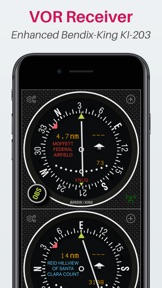
• VHF Omnidirectional Range Receiver (VOR) - a virtual Bendix-King KI-203 VOR
• Automatic Direction Finder (ADF) - a virtual Bendix-King KI-227 ADF
• Artificial Horizon - a virtual Bendix-King KG-258 artificial Horizon
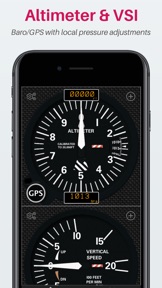
• Vertical Speed Indicator (VSI)
• Aircraft Compass, with functioning heading bug
• Altimeter - with functioning pressure adjustments
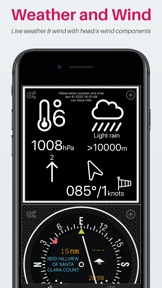
• Weather and Wind - display current live weather and wind information including head/crosswind components
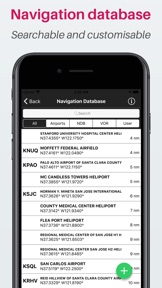
fDeck contains a regularly updated worldwide navigation database containing over 20 thousand airports and navigation stations that you can virtually tune. You can also create your own virtual stations at any location of your choosing. This lets you practice flight navigation procedures at airports that are not equipped with existing real-world VOR or NDBs.
In addition to the beautiful flight deck, fDeck also has a built-in aviation moving map that shows your location as well as relevant airspace, airport and navigation data. You can move your location on the map to reposition your virtual aircraft and the flight instruments will reflect this new location. This allows you to use fDeck as a radio navigation trainer - you can see in real-time what the VOR, HSI or NDB will look like at your new location!
Do you use the X-Plane flight simulator? You can drive the fDeck flight instruments straight from X-Plane itself using our free X-Plane connector.
Key features:
• Instruments are proudly graphically accurate with ultra smooth animations
• Grid and Swipe user interface modes
• Go full-screen to focus on a single instrument
• Tune each instrument slot to a different radio station
• Map view with aviation overlays showing location and tuned radio stations
• Simulate flight by panning your location on the map - use the app as a radio aids trainer!
• Worldwide aviation database containing over 20k airports and radio navigation aids, updated monthly
• Fully searchable navigation database, filterable by type
• Each instrument has an associated video tutorial
• Add your own nav aids - want to practice VOR radial tracking on your house - now you can!
• Supports tablets and phones and both portrait and landscape orientations
This app has taken years of work by the developer, who provides it free for your use. The app does have in-app ads. By joining the fDeck Premium Lounge via an in-app subscription or one-time purchase you can remove all in-app ads, remove the 5 user station limitation, get monthly navigation database updates and get unlimited access to the X-Plane fDeck connector.
Any payments or subscriptions will be charged to your account at confirmation of purchase. Subscriptions will automatically renew unless cancelled within 24-hours before the end of the current period. You can cancel anytime through your account settings. Full details of our Terms of Service can be found at the following URL https://www.sensorworks.co.uk/terms/
Novedades de la versión 2.3.6
• NEW LAYOUT ENGINE
The layout engine has been completely rewritten from scratch. Following feedback from my amazing users I have simplified the layout to make it far easier to use whilst flying. Gone is the slightly awkward and problematic pan/zoom canvas. Instead there is now two modes, ‘Grid’ and ‘Swipe’. The app defaults to Grid on tablets and Swipe on all other devices. Try each layout out and see which you prefer on your device. You can switch layouts in the app settings. In addition to the new layout modes, a ‘double-click’ interface has been added to each instrument. Double clicking on any instrument will immediately make it fullscreen. Double clicking on it again will return you to the flight deck grid/swipe layout.
• NEW X-PLANE CONNECTOR
You can connect your X-Plane flight simulator to fDeck! Practice using fDeck "in-flight", or use fDeck as permanent external flight deck for X-Plane - the way you use it is only limited by your imagination! fDeck even sends commands to X-Plane to tune nav1/nav2/adf1 and synchronise OBS settings! I must admit that I built the plugin to enable me to better test fDeck without having to go flying. Testing the app is a great excuse to fly I know, but prohibitively expensive! More details can be found on our website, under the X-Plane plugin section, including instructions on how to download and install the plugin.
• NAVIGATION DATABASE
- now includes complete coverage of US and Canada (previously airports only)
- database now updated on a monthly cycle
- premium lounge membership required for updates
- station list now colour codes stations that are currently tuned
- all stations now have a valid ident
- added a radio detune button
- added option to manually check for cycle updates
- added instructional video to database info screen
- added Ad banner to screen for non-premium members
• MAP
- map now depicts to/from radials as set by the any tuned instruments OBS
- aviation overlays enhanced with US sectionals and IFR enroute low-altitude charts
- added instructional video to settings screen
• HSI
- no longer a 'premium' instrument
- added option to select the heading source (Auto/GPS/Mag)
- added instructional video to settings screen
• VOR
- corrected bug whereby the OBS needle sometimes acted in reverse!
- enhanced responsiveness of the OBS/needle operation
- added instructional video to settings screen
• ADF
- added option to select the heading source (Auto/GPS/Mag)
- added rotatable bug to aid tracking/joining a hold
- reversed arrangement of time to station and distance-to-go to match VOR
- added instructional video to settings screen
• ALTIMETER
- fixed numerous bugs around the altitude source
- added text to display altimeter units
- added dislay of ambient detected pressure (bottom right)
- the altimeter knob is now a button and cycles between GPS/STD and baro referenced altitude
- added instructional video to settings screen
• VSI
- fixed numerous bugs around the vertical speed source
- option added to select units of vertical speed - ft/min or m/min
- added instructional video to settings screen
• COMPASS
- added option to select the heading source (Auto/GPS/Mag)
- corrected heading bug functionality to rotate with card
- added indication of sensor source when in auto mode
- added instructional video to settings screen
• ATTITUDE INDICATOR
- fixed bug whereby 'level' didn't work correctly when device was in landscape
- added instructional video to settings screen
• OTHER WORK/IMPROVEMENTS
- fixed time to station units to show correct time to station
- rework of location sub-system to be more reliable on app suspend/resume
- stability and performance improvements across the entire application
- enhanced animations - visual effects smoother and utilise less CPU overhead/power
- screen auto-rotate option removed. The app uses a fixed orientation - change in app settings
- many other minor bug fixes and improvements too numerous to detail!
Vendedor
Nombre
Darren Yeates
Dirección
Información
Desarrollador
Categorías
Versión
2.3.6
Tamaño
51.5 MB
Game Center
No
VPP Device Licensing
Sí
Puntuación
Clasificación: 4+
Compatibilidad
iOS 12.0 o posterior
Dispositivos
iPhone 5s, iPhone 6, iPhone 6 Plus, iPhone 6s, iPhone 6s Plus, iPhone SE, iPhone 7, iPhone 7 Plus, iPhone 8, iPhone 8 Plus, iPhone X, iPhone XR, iPhone XS, iPhone XS Max, iPhone 11, iPhone 11 Pro, iPhone 11 Pro Max, iPhone SE (segunda generación), iPhone 12, iPhone 12 Pro, iPhone 12 Pro Max, iPhone 12 mini, iPad (quinta generación) Wi-Fi, iPad (quinta generación) Wi-Fi + Cellular, iPad (sexta generación) Wi-Fi, iPad (sexta generación) Wi-Fi + Cellular, iPad Pro, iPad Pro (Cellular), iPad Pro (9.7 pulgadas), iPad Pro (9.7 pulgadas) (Cellular), iPad Pro (12,9 pulgadas, segunda generación), iPad Pro (12,9 pulgadas, segunda generación) Wi-Fi + Cellular, iPad Pro (10,5 pulgadas), iPad Pro (10,5 pulgadas) Wi-Fi + Cellular, iPad Pro (11 pulgadas), iPad Pro (11 pulgadas) Wi-Fi + Cellular, iPad Pro (12,9 pulgadas, tercera generación), iPad Pro (12,9 pulgadas, tercera generación) Wi-Fi + Cellular, iPad Air, iPad Air (Cellular), iPad Air 2, iPad Air 2 (Cellular), iPad Air (tercera generación), iPad Air (tercera generación) Wi-Fi + Cellular, iPad mini Retina, iPad mini Retina (Cellular), iPad mini 3, iPad mini 3 (Cellular), iPad mini 4, iPad mini 4 (Cellular), iPad mini (quinta generación), iPad mini (quinta generación) Wi-Fi + Cellular, iPad (séptima generación) Wi-Fi + Cellular, iPad Pro de 11 pulgadas (segunda generación), iPad Pro de 11 pulgadas (segunda generación) (Wi-Fi + Cellular), iPad Pro de 12,9 pulgadas (cuarta generación), iPad Pro de 12,9 pulgadas (cuarta generación) (Wi-Fi + Cellular), iPad Air (4th Generation) (Wi-Fi), iPad Air (4th Generation) (Wi-Fi + Cellular), iPad (octava generación) Wi-Fi, iPad (octava generación) Wi-Fi + Cellular, iPad Pro de 11 pulgadas (tercera generación), iPad Pro de 11 pulgadas (tercera generación) (Wi-Fi + Cellular), iPad Pro de 12,9 pulgadas (quinta generación), iPad Pro de 12,9 pulgadas (quinta generación) (Wi-Fi + Cellular), iPod touch (sexta generación), iPod touch (séptima generación)
Idiomas
inglés
App Store: Valoraciones de clientes
Calificaciones y reseñas
0.0 de 5 (Sin valoración)
App Store: Reseñas de usuarios
Ninguna entrada