Actualizando


Capturas de pantalla del iPhone

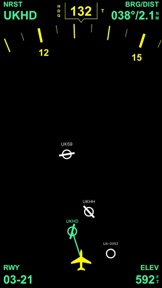


Capturas de pantalla del iPad


Descripción
i-EFIS simulates a modern glass cockpit for general aviation and provides the following features:
1. Display iOS iPhone and iPad sensor data: The attitude indicator is driven by the 3D MEMS chip, speed and altitude come from the internal or external GPS (only iOS devices with cellular connection have the integrated GPS!)
2. Or connect the iPhone to a iLEVIL „SW“, „AW“ or „Sport“ device (available at the LEVIL company or in many pilot shops) by WIFI device to get precise attitude and GPS data.
3. A 80 or 360 degree course rose (change with tap on airplane symbol)
4. Magnetic and True GPS track (display in white with with track line)
5. Magnetic or True Heading, heading data is provided by internal compass and is not always reliable.
6. iEFIS Pro version (simple upgrade via inapp purchase!) displays a worldwide airport database and always shows the bearing to the nearest airport from your position with distance, elevation and runway orientation of the main runway of that airport.
How to use i-EFIS
1. Tap the speed window to toggle speed units: km/h - mph - knots. Speed displayed is a GPS ground speed
2. Tap on the altitude window to switch from feet MSL to Meters MSL
3. Tap the course window to select the course mode: Magnetic Heading - True Heading - Magnetic Track - True Track. All GPS track modes are displayed in white, heading modes are yellow
4. Tap the airplane symbol to display either the full 360 degree course rose or a 80 degree segment
Pro version features
1. Tap on Runway orientation info to see runway length
2. Tap course window and slide up to hide attitude indicator and to switch to full screen mode
3. To calibrate magnetic heading tap course window to show "HDG" (Magnetic Heading), and slide finger left or right to set correct heading. Use airplane's compass as reference
4. To select a different airport than the nearest one simply tap on the airport symbol and the app will display the data for this airport
5. To go back to the nearest airport simply tap the empty space between the airports
Airport database in Pro version:
1. Switch Airport database on or off in settings.
2. Use the two finger pinch gesture to zoom airport map in/out
More cool Features coming!
Novedades de la versión 2.8
- Corrected a bug that was responsible for wrong bearing indication when zooming into map
- Adjusted app for latest iOS version
Vendedor
Nombre
airWORK aviation media UG (haftungsbeschraenkt)
Dirección
Información
Desarrollador
Categorías
Versión
2.8
Tamaño
26.2 MB
Game Center
No
VPP Device Licensing
Sí
Puntuación
Clasificación: 4+
Compatibilidad
iOS 8 o posterior
Dispositivos
iPhone 4S, iPhone 5, iPhone 5c, iPhone 5s, iPhone 6, iPhone 6 Plus, iPhone 6s, iPhone 6s Plus, iPhone SE, iPhone 7, iPhone 7 Plus, iPhone 8, iPhone 8 Plus, iPhone X, iPhone XR, iPhone XS, iPhone XS Max, iPhone 11, iPhone 11 Pro, iPhone 11 Pro Max, iPhone SE (segunda generación), iPhone 12, iPhone 12 Pro, iPhone 12 Pro Max, iPhone 12 mini, iPhone 13, iPhone 13 Pro, iPhone 13 Pro Max, iPhone 13 mini, iPhone SE (tercera generación), iPad 2 (Wi-Fi), iPad 2 (3G), iPad (tercera generación) (Wi-Fi), iPad (tercera generación) (4G), iPad (4th Generation) (Wi-Fi), iPad (4th Generation) (4G), iPad (quinta generación) Wi-Fi, iPad (quinta generación) Wi-Fi + Cellular, iPad (sexta generación) Wi-Fi, iPad (sexta generación) Wi-Fi + Cellular, iPad Pro, iPad Pro (Cellular), iPad Pro (9.7 pulgadas), iPad Pro (9.7 pulgadas) (Cellular), iPad Pro (12,9 pulgadas, segunda generación), iPad Pro (12,9 pulgadas, segunda generación) Wi-Fi + Cellular, iPad Pro (10,5 pulgadas), iPad Pro (10,5 pulgadas) Wi-Fi + Cellular, iPad Pro (11 pulgadas), iPad Pro (11 pulgadas) Wi-Fi + Cellular, iPad Pro (12,9 pulgadas, tercera generación), iPad Pro (12,9 pulgadas, tercera generación) Wi-Fi + Cellular, iPad Air, iPad Air (Cellular), iPad Air 2, iPad Air 2 (Cellular), iPad Air (tercera generación), iPad Air (tercera generación) Wi-Fi + Cellular, iPad mini (Wi-Fi), iPad mini (4G), iPad mini Retina, iPad mini Retina (Cellular), iPad mini 3, iPad mini 3 (Cellular), iPad mini 4, iPad mini 4 (Cellular), iPad mini (quinta generación), iPad mini (quinta generación) Wi-Fi + Cellular, iPad (séptima generación) Wi-Fi + Cellular, iPad Pro de 11 pulgadas (segunda generación), iPad Pro de 11 pulgadas (segunda generación) (Wi-Fi + Cellular), iPad Pro de 12,9 pulgadas (cuarta generación), iPad Pro de 12,9 pulgadas (cuarta generación) (Wi-Fi + Cellular), iPad Air (4th Generation) (Wi-Fi), iPad Air (4th Generation) (Wi-Fi + Cellular), iPad (octava generación) Wi-Fi, iPad (octava generación) Wi-Fi + Cellular, iPad Pro de 11 pulgadas (tercera generación), iPad Pro de 11 pulgadas (tercera generación) (Wi-Fi + Cellular), iPad Pro de 12,9 pulgadas (quinta generación), iPad Pro de 12,9 pulgadas (quinta generación) (Wi-Fi + Cellular), iPad (novena generación), iPad (novena generación) Wi-Fi + Cellular, iPad mini (sexta generación), iPad mini (sexta generación) Wi-Fi + Cellular, iPad Air (quinta generación), iPad Air (quinta generación) Wi-Fi + Cellular, iPod touch (5.ª generación), iPod touch (sexta generación), iPod touch (séptima generación)
Idiomas
inglés
App Store: Valoraciones de clientes
Calificaciones y reseñas
0.0 de 5 (Sin valoración)
App Store: Reseñas de usuarios
Ninguna entrada